Fridge Photo Analysis: A Decision Framework for Understanding What Happens Between the Snap and the Suggestion
6 August 2026
Discover how fridge photo analysis works with this decision framework, understand each step from image capture to meal suggestion and reduce food waste at home.
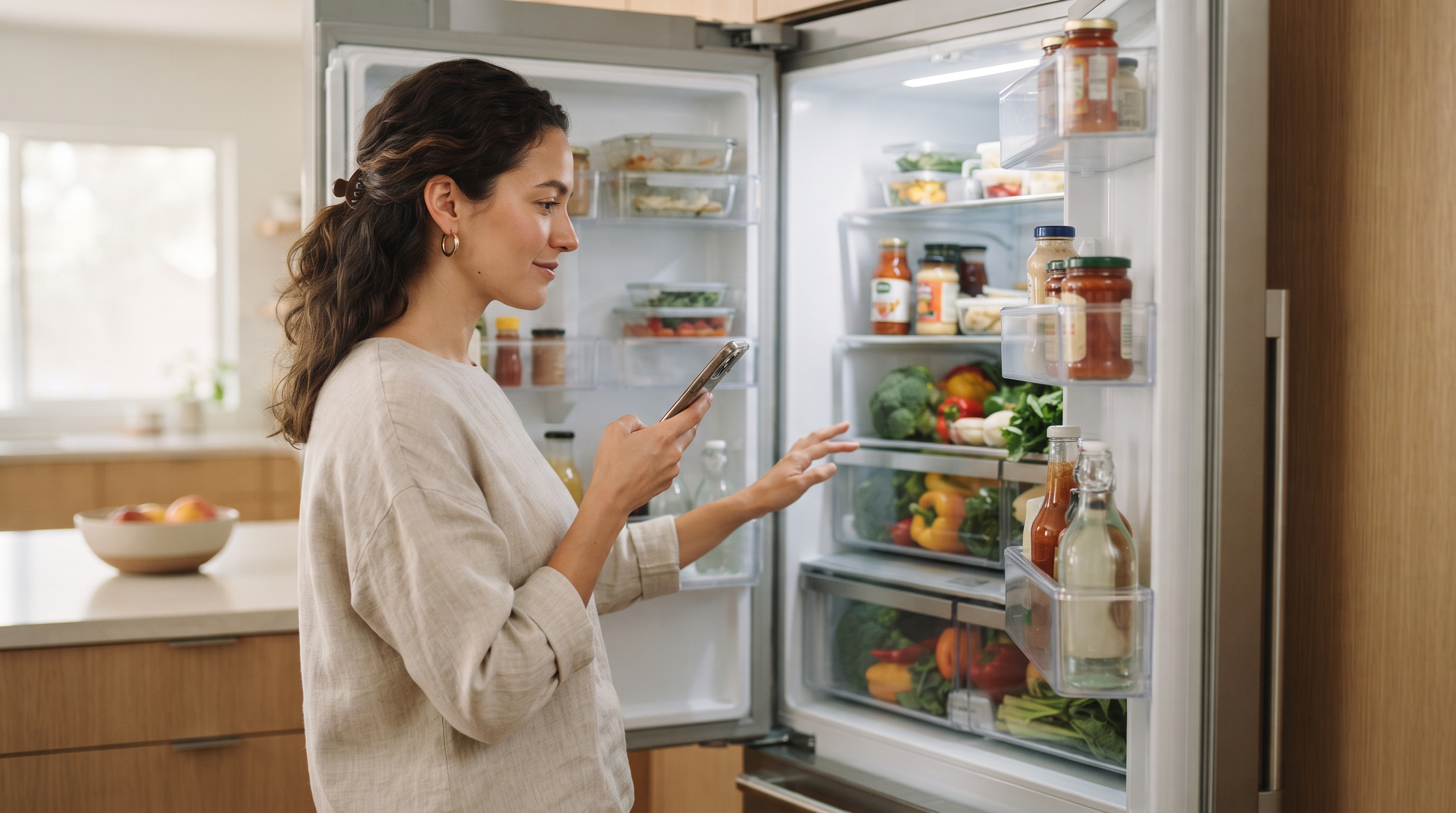
According to the UN Environment Programme's 2024 Food Waste Index, households generate an estimated 631 million tonnes of food waste annually, and a significant share traces back to a surprisingly simple problem: people do not know what they already have at home. Forgetting about the half-used jar of tahini or the zucchini slowly softening in the crisper drawer is not a character flaw. It is a visibility problem.
Table of Contents
- What Fridge Photo Analysis Actually Does (And What It Skips)
- The Snap-to-Plate Framework: Five Stages Between Photo and Dinner
- Where Most Smart Cooking Apps Get Ingredient Detection Wrong
- Fridge Photo Analysis vs Typed Ingredient Lists: When Each Approach Fits
- How Pantry Inventory Tracking Changes What Photo Analysis Can Offer
- From Photo to Plate: A Hypothetical Week with a Fridge-Aware Cooking App
- Free AI Recipe Generators vs Subscription Tools: A Tradeoffs Comparison
- Readiness Checklist: Is Fridge Photo Analysis Right for Your Kitchen
Key Takeaways
| Point | Details |
|---|---|
| Photo analysis is step one, not the whole solution | Identifying ingredients only matters if the system connects that data to recipes, dietary rules, and pantry memory. |
| Pantry context separates useful tools from novelty | Without knowing your staples, a fridge photo alone produces incomplete suggestions. |
| Free tools trade privacy for access | Free AI generators often use your ingredient and dietary data for model training or advertising. |
What Fridge Photo Analysis Actually Does (And What It Skips) Fridge photo analysis converts a single photograph of your refrigerator into a structured ingredient list using computer vision and large language models. Most people assume the photo is the hard part. It is not. The interesting work happens after the snap. The basic pipeline follows three stages: image capture, AI processing, and ingredient output. You take a photo. The AI identifies what it sees. You get a list of ingredients ready for recipe matching. The photo itself is discarded immediately after analysis, according to FridgeAI, and is never stored or reused. What the AI sees well: whole vegetables, fruit, bottles with visible labels, packaged items with readable text, eggs, dairy containers, and anything with a distinct shape or color. A block of cheese sitting in the open is easy. A jar of miso with its label facing forward is easy. What it misses is more revealing. Based on FridgeAI's experience, three categories of ingredients consistently fall outside reliable detection, a pattern the team calls the Visibility Gap Framework: - Occluded items: anything hidden behind taller containers or pushed to the back of a shelf - Ambiguous containers: unlabeled jars, opaque Tupperware, foil-wrapped leftovers where the AI cannot determine contents - Contextual unknowns: items where visual similarity creates confusion, like distinguishing Greek yogurt from sour cream in identical white tubs One condition where this changes: well-organized fridges with items facing forward and minimal stacking produce significantly more accurate ingredient lists, which is why some users rearrange slightly before snapping. This is why fridge photo analysis works best alongside a pantry feature that tracks your staples separately. The photo captures what is visible right now. The pantry remembers what is always there.
The Snap-to-Plate Framework: Five Stages Between Photo and Dinner Every fridge photo passes through five distinct stages before it becomes something you actually eat, and most tools quit halfway through. Understanding where the chain breaks helps you pick the right one. Stage 1: Capture. You take the photo. The key requirement is simple: the tool needs to work with a real fridge, not a styled one.
- Handles poor lighting and cluttered shelves - Accepts a single snapshot, not multiple angles Stage 2: Detection. The AI identifies what it sees. This is where most basic tools stop.
- Recognizes partial containers and unlabeled items - Distinguishes between similar ingredients (Greek yoghurt vs. sour cream) Stage 3: Context. This is the stage that separates useful tools from clever demos. Detection alone does not know you keep soy sauce in the cupboard or that your kid cannot eat tree nuts.
- Combines detected ingredients with a remembered pantry - Applies stored dietary rules without re-asking Stage 4: Suggestion. The tool proposes meals. One condition where this changes: if a tool skips Stage 3, its suggestions ignore half your kitchen and all your constraints.
- Offers a small, curated set of options rather than an overwhelming list - Accounts for available cooking equipment Stage 5: Adaptation. You adjust the recipe mid-conversation. Less spice, swap the protein, make it faster.
- Supports natural-language tweaking - Remembers adjustments for future suggestions
| Stage | Basic photo tools | Context-aware tools (e. g. FridgeAI) |
|---|---|---|
| Capture | Yes | Yes |
| Detection | Yes | Yes, via Claude AI API |
| Context | No | Pantry memory + dietary profiles |
| Suggestion | Generic | Personalized, three options |
| Adaptation | No | Conversational tweaking |
Where Most Smart Cooking Apps Get Ingredient Detection Wrong Detection accuracy is not the hardest part of fridge photo analysis.
Based on FridgeAI's experience, what matters far more is what the system does with the information afterward. Pantry context, dietary memory, equipment awareness, and taste learning are what turn a photo into a useful dinner suggestion. A tool that perfectly identifies every item in your fridge but ignores that you have no oven, or that someone in your household is allergic to tree nuts, still fails you at the moment that matters. This is the gap most smart cooking apps fall into. They invest heavily in recognition and barely at all in contextual intelligence. Imagine you snap a photo showing eggs, spinach, feta, and a red pepper. A detection-only tool sees four ingredients and returns a generic frittata. A contextually aware tool knows you also keep smoked paprika and olive oil in your pantry, that your partner avoids gluten, and that you prefer recipes under 30 minutes. Same photo, completely different suggestion. One condition where this changes: if you are cooking solo with no dietary constraints and a fully stocked kitchen, raw detection accuracy alone might be enough. Most households are not that simple.
Fridge Photo Analysis vs Typed Ingredient Lists: When Each Approach Fits Fridge photo analysis works best for cooks who open the door without a plan, while typed ingredient lists suit people who already know what they have and want to search deliberately. Neither is universally better. The right choice depends on how you actually decide what to cook. Here is how the two approaches compare across the criteria that matter most in a real kitchen: - Speed of input. Snapping a photo takes seconds. Typing a list of 12 ingredients takes meaningfully longer, and most people quit partway through. Photo analysis removes the cataloguing step entirely.
- Accuracy. Typed lists are more precise because you control every entry. Photo analysis depends on lighting, container visibility, and how cluttered your shelves are. A jar of miso behind the milk might get missed.
- Flexibility. Typed lists let you include pantry staples that are not in the fridge at all. Photo analysis captures only what the camera sees unless the tool also maintains a separate pantry memory.
- Planning style. If you meal plan on Sundays, typed input fits your workflow. If you decide at 6pm based on what is actually there, photo analysis matches how your brain already works. One condition where this changes: households that keep a well organized, sparse fridge actually get higher accuracy from photo analysis than from typed lists, because every item is visible and identifiable. Some tools offer barcode scanning as a third input method, which trades speed for precision. It works well for packaged goods but falls apart with loose produce and leftovers. The fridge photo analysis feature described here uses a vision AI to analyze fridge photos and suggests three recipes based on what it actually sees, while also maintaining a pantry profile so staples are never forgotten.
How Pantry Inventory Tracking Changes What Photo Analysis Can Offer A fridge photo without pantry context is like reading half a sentence. The photo captures what is perishable and visible, but it misses everything sitting in your cupboard: olive oil, soy sauce, smoked paprika, a small jar of miso. Those staples are the difference between "you have eggs and spinach" and "you can make a proper frittata. " Good pantry tracking fills that gap. Here is what it should include: - A running list of staples your household actually keeps on hand - Automatic updates as you cook through ingredients - The ability to manually add or remove items at any time - Integration with recipe suggestions so every recommendation reflects your full kitchen, not just the fridge shelf Imagine you photograph a fridge containing chicken thighs, a lemon, and some wilting kale. Without pantry data, the system guesses conservatively. With a pantry that knows you keep fish sauce, coconut milk, and rice, it can suggest a coconut chicken bowl. That is a fundamentally different meal.
| Approach | What it captures | What it misses |
|---|---|---|
| Fridge photo alone | Perishable items visible in the shot | Pantry staples, spices, oils, sauces |
| Manual pantry list | Everything you remember to add | Items you forget or use up without logging |
| Learning pantry system | Staples inferred from your cooking history | Newly purchased items not yet cooked with |
From Photo to Plate: A Hypothetical Week with a Fridge-Aware Cooking App
Most fridge photo analysis only matters if it changes what happens over multiple days, not just one meal. A single snapshot is a novelty. A week of snapshots, cross-referenced against what you already cooked and what is about to go bad, is a different tool entirely.
Imagine a two-parent household where both adults cook but neither wants to plan meals. The household has one rule that complicates everything: one parent eats vegetarian on weekdays, and both parents need the kids to actually eat what is served.
Monday evening, a fridge photo catches bell peppers, chicken thighs, yoghurt, and some wilting spinach. The app checks the pantry (cumin, smoked paprika, soy sauce) and the household's dietary profile. It returns three suggestions. Two are vegetarian. One uses the chicken thighs for the kids and the non-vegetarian parent. The vegetarian parent picks a stuffed pepper option. Nobody negotiated.
By Wednesday, the system has logged Tuesday's cook. It avoids suggesting anything pepper-heavy again. It also notices the yoghurt is still there and leans toward a marinade or a raita. One condition where this changes: if the household has marked yoghurt as a breakfast staple in their pantry, the app would not try to cook with it.
Friday is where household memory earns its keep. The app flags half a bunch of coriander that appeared in Monday's photo and has not been used. It suggests a quick noodle bowl that uses the coriander, some leftover protein, and whatever vegetables remain.
No meal plan was written. No spreadsheet was consulted. The fridge photo analysis simply accumulated context across the week, remembering dietary rules, avoiding repetition, and nudging ingredients toward the plate before they reached the bin. That is the difference between a photo feature and a cooking system.
Free AI Recipe Generators vs Subscription Tools: A Tradeoffs Comparison Free AI recipe generators cost nothing upfront but frequently monetize through your data instead of your wallet. That tradeoff deserves a closer look than most people give it. Consider a parent managing a household where one child has a nut allergy and the other refuses anything with visible onions. A free tool might generate a decent recipe tonight. Tomorrow, it will have forgotten everything about your family. Here is where the two models diverge in practice:
| Criteria | Free generators | Subscription tools |
|---|---|---|
| Data usage | Often use ingredient lists and dietary details to train models or serve ads | Typically operate under stricter privacy terms with no data resale |
| Session memory | Start fresh every time | Remember past meals, preferences, and rejections |
| Dietary rules | Must be re-entered each session | Stored and applied automatically |
| Shared kitchen support | Rarely available | Some tools support co-chef access and shared history |
| Personalization depth | Generic suggestions based on current input only | Suggestions improve over time as cooking patterns accumulate |
Readiness Checklist: Is Fridge Photo Analysis Right for Your Kitchen Fridge photo analysis solves a specific set of kitchen problems, and if those problems are not yours, a simpler tool will serve you better. This checklist helps you figure out which side you fall on before you commit to anything. Work through these five questions honestly: 1. Do you decide what to cook less than an hour before you need to eat? If dinner planning happens at 5:45 PM while someone asks what's for dinner, photo-based analysis fits the way you actually operate. Planned-ahead households get less value here.
- Do you regularly forget what you have in the fridge? That half-block of feta behind the milk, the ginger you bought last Tuesday. If ingredients routinely expire because you lost track of them, a visual scan catches what your memory misses.
- Do multiple people cook in your household? Shared kitchens create information gaps. One person buys cilantro; the other does not know it exists. Tools like FridgeAI address this with a co-chef feature and shared pantry, so both cooks work from the same picture.
- Do you manage dietary rules that need to be remembered every single meal? Nut allergy for one kid, no dairy for another. Photo analysis tools that store household dietary profiles filter suggestions automatically, removing the mental load of re-checking every recipe.
- Do you tend to buy the same ingredients and cook the same eight meals? This is the rut question. If your answer is yes and you wish it were not, fridge photo analysis introduces variety from ingredients you already own. Reading your answers: If you said yes to three or more, photo-based tools address friction you are already living with.
Summary
Fridge photo analysis is not really about whether a camera can identify a bell pepper. That part works. The meaningful differences between tools live in what happens next: whether the system remembers your household's rules, connects what it sees to what is already in your pantry, and offers suggestions shaped by how you actually cook.
The Snap-to-Plate Framework gives you a way to evaluate that full chain rather than fixating on detection accuracy alone. The readiness checklist helps you know whether your kitchen habits are set up to benefit from a context-aware tool or whether you would get the same value from a simple recipe search.
The next problem worth solving is the one most households avoid: figuring out whether the meals you cook each week actually use what you buy.
Fridge Photo Analysis: A Decision Framework for Understanding What Happens Between the Snap and the Suggestion Most people assume a fridge photo app just reads labels.
The real work happens in the layers between recognizing an ingredient and suggesting something you would actually want to eat.
Frequently Asked Questions
What happens to my fridge photo after it is analyzed?
Your fridge photo is discarded immediately after the AI identifies your ingredients and is never stored, sold, or reused. According to FridgeAI, images are processed solely for analysis, and once the system recognizes what you have, the image is gone. This is a meaningful distinction from tools that retain photos for model training. One condition where this changes: free tools may process photos differently, so always check their privacy policy before uploading.
How accurate is fridge photo analysis at detecting ingredients?
Modern AI vision models identify common grocery items with high reliability, though accuracy drops with unlabeled containers, partially obscured items, and similar-looking ingredients like types of cheese. Based on FridgeAI's experience, the system improves its understanding of your kitchen over time through your pantry profile. A well-lit, uncluttered fridge photo consistently produces better results than a dark, crowded one. If your fridge is tightly packed, expect to manually add a few items the camera cannot see clearly.
Do I need to sign up to try an AI recipe generator based on fridge photos?
FridgeAI offers a 10-day free trial with no credit card required, so you can test the tool before committing to anything. The trial includes photo-based fridge scanning, multiple recipe suggestions, conversational tweaking, and shared kitchen access. The app installs directly from your browser as a PWA, so there is no app store step either. If you do not subscribe after the trial, your data is automatically and permanently deleted.
How does a pantry inventory tracker improve recipe suggestions?
A pantry inventory tracker gives the system visibility into staples you always keep on hand, not just what appears in a single fridge photo, which produces fundamentally more complete recipe suggestions. Based on FridgeAI's experience, building a pantry profile over time, tracking items like olive oil, soy sauce, and spices, means suggestions reflect your full kitchen rather than a partial snapshot. You can add or remove items yourself at any point. The practical result is fewer irrelevant recipes and less repeated friction around basic ingredients you always keep stocked. One condition where this changes: if your pantry contents shift dramatically week to week, the tracker requires more frequent manual updates to stay useful.
Can fridge photo analysis handle dietary requirements for my household?
Yes, fridge photo analysis tools that support household profiles apply your stored dietary rules automatically to every suggestion, every time. FridgeAI lets you set allergies, intolerances, and foods your household never eats during setup, so you never need to re-explain them. One condition where this changes: if household members have conflicting dietary needs that shift frequently, even a memory-based system requires occasional manual updates to stay accurate.
What is the difference between a smart cooking app and a digital meal planner?
A smart cooking app responds to what you have right now, while a digital meal planner organizes what you intend to buy and cook later. Planners excel at grocery efficiency and weekly structure. Smart cooking apps solve a different problem: the 6 PM moment when you are staring into your fridge with no plan. Some households benefit from both, but they address opposite ends of the decision timeline. Choosing between them depends on whether your friction lives in the planning stage or the execution stage.
Are free AI recipe generators as good as paid ones?
Free AI recipe generators are meaningfully weaker than paid ones because they lack memory, personalization, and household awareness. They generate recipes, but they do not learn your taste or remember your pantry. According to FridgeAI, free tools often fund their service through user data, meaning your ingredient lists and dietary details may train models or serve advertising. Paid tools invest in privacy-first architecture and features like co-chef access and taste learning that compound in usefulness over time. The gap between free and paid narrows only when your cooking habits are simple and consistent.